GxP document control is the set of procedures that govern how regulated records are drafted, reviewed, approved, distributed, revised, and retired, with evidence at every step. A compliant system guarantees three things at a minimum: approval evidence that cannot be altered after the fact, distribution that reaches every point of use, and retention that keeps records retrievable for their full mandated life. These are the first items an inspector checks, before they read a single SOP's content.
TL;DR:
>
- GxP document control requires rigorous approval, distribution, revision tracking, and retention processes that are continuously evidenced and fully traceable.
- The document lifecycle encompasses six stages—draft, review, approval, distribution, revision, and archiving—each demanding specific records and a master register for inspection readiness.
- Regulatory frameworks like EU EudraLex, 21 CFR Part 11, and ISO 13485 require proof of record authenticity, user identity, and version control, with a focus on maintaining record integrity and accessibility.
- Implementing validated automation tools ensures ALCOA+ compliance at both creation and review, reducing manual errors, time, and risk of systemic gaps during inspections.
- Clear ownership responsibilities, linking document control to risk assessments, and fixing key issues within 30 to 180 days significantly improve audit preparedness and operational compliance.
Table of Contents
- What Is GxP Document Control and Which Documents Does It Cover?
- How Does the Document Lifecycle Work, and What Records Does Each Stage Require?
- Which Regulations Define What "Compliant" Document Control Looks Like?
- How Does ALCOA+ Apply to Controlled Documents?
- How Do You Configure an eQMS for GxP Document Control?
- What Are the Most Common Document-Control Findings in an Audit?
- What Should You Fix in the First 30, 90, and 180 Days?
- What Does Automated Validation Add to Document Control?
- Who Owns Document Control, and What Do They Actually Do?
- How Should Document Control Connect to Risk Management?
- Author perspective: practical priorities and pitfalls
- Get Audit-Ready Document Control Without the Manual Burden
- Sources
- FAQ
What Is GxP Document Control and Which Documents Does It Cover?
GxP document control extends beyond storing files. It applies regulated controls, revision history, approval workflows that capture signature meaning, distribution tracking, and training linkage to every record that governs or evidences a GxP activity. A controlled document system differs from a plain document management system precisely because it adds these layers.
The scope is broad. Standard operating procedures, batch records, validation protocols and reports, specifications, work instructions, forms, and quality manuals all fall under document control. So do training records tied to those documents, and, less obviously, the document-control SOP itself. Auditors love tracing a single controlled document end to end, and if the procedure that governs document control cannot survive that trace, everything downstream is suspect.
How Does the Document Lifecycle Work, and What Records Does Each Stage Require?
Every controlled document moves through six stages, and each one leaves a paper trail an inspector expects to see intact.
- Draft: authorship and initial version control, usually with a working revision number distinct from the released version.
- Review: documented review comments, reviewer identity, and resolution of each comment before approval.
- Approval: a signed approval record capturing who approved it, when, and what that signature legally means.
- Effective/distribution: a distribution log showing who received the current version and confirming obsolete copies were withdrawn.
- Revision: a revision history that explains what changed, why, and links to the change control or CAPA that triggered it.
- Obsolescence/archival: a retirement record and archived copy retained per your retention schedule.
A master document register ties all of this together: document number, title, owner, current version, status, effective date, and storage location are the minimum fields auditors expect. During an inspection, that register is often the first thing requested, because it lets an auditor pick any document and immediately verify its current state against what is in use on the floor.
Which Regulations Define What "Compliant" Document Control Looks Like?
Three regulatory frameworks anchor almost every document-control requirement you will be asked to demonstrate.
- EU EudraLex Volume 4, Chapter 4 and Annex 11: Chapter 4 requires documentation that establishes, controls, monitors, and records activities affecting product quality, with explicit expectations for generation, control, review, approval, and retention. Annex 11 extends this to computerized systems, requiring periodic evaluation and risk-based validation of any system that manages those records.
- 21 CFR Part 11: governs electronic records and electronic signatures. Any eQMS or DMS you rely on must capture signature meaning, identity, and timestamp, and keep records secure and retrievable for their full retention period.
- ISO 13485 §4.2.4, WHO, and PIC/S guidance: these reinforce the same principles for medical devices and across jurisdictions, with PIC/S and WHO guidance emphasizing unique document identification, periodic review, and protection against inadvertent use of superseded versions.
Together, these frameworks describe the same underlying expectation from three different angles: prove the record is real, prove who touched it, and prove it stayed current.
How Does ALCOA+ Apply to Controlled Documents?
ALCOA+ turns data integrity from an acronym into a checklist you can actually inspect against. Each attribute maps to a specific control on a controlled document, and each has a common failure mode QA teams should recognize before an auditor does.
Attributable means every entry ties to a specific person, not a shared login. Legible and Contemporaneous mean entries are readable and recorded at the time of the activity, not reconstructed later, which is exactly what a backdated signature violates. Original and Accurate require the record to reflect the true source data, with corrections that show rather than hide the original entry. The "plus" attributes, Complete, Consistent, Enduring, and Available, cover the gaps that trip up otherwise solid documents: an incomplete revision history, inconsistent version numbers between the register and the file, or a record that technically exists but takes three weeks to retrieve.
Documentation lapses remain among the most frequently cited inspection findings in GMP facilities, and backdated approvals or missing revision history are recurring examples. Remediation usually means retraining on contemporaneous recording, tightening review-comment capture, and auditing the register against actual file versions on a set schedule.
How Do You Configure an eQMS for GxP Document Control?
Configuring a system for GxP use is a validation exercise, not a settings menu. Follow a sequence that produces the evidence an inspector will ask for.
- Define validation scope. Document user requirements, then generate IQ/OQ/PQ or CSV artifacts proportional to system risk, per Annex 11's risk-based validation principle.
- Build in technical controls. Role-based access control, tamper-evident audit trails, electronic signatures that capture meaning and identity, and version locking that prevents silent overwrites.
- Set operational controls. Backup and restore procedures, defined archiving rules, clear treatment of any hybrid paper-electronic processes, and a schedule for periodic evaluation of the system itself.
Pro Tip: Test your audit trail by trying to alter an approved document without triggering a new version. If the system lets you, you have found your biggest finding before an inspector does.
Hosted or cloud services need documented supplier control and service-level agreements, since governance responsibility does not transfer with the hosting arrangement.
What Are the Most Common Document-Control Findings in an Audit?
Inspectors see the same handful of gaps repeatedly, and most trace back to disconnected systems rather than bad intentions.
- Outdated SOPs still in use on the floor: mitigated by gating shop-floor access to documents behind current-version checks and withdrawing superseded copies at distribution.
- Training not completed before a revision takes effect: mitigated by gating the effective date itself on documented training completion, not the other way around.
- Backdated or undated approvals: mitigated by requiring timestamped electronic signatures with enforced sequencing.
- Incomplete revision trails: mitigated by requiring review-comment records and change rationale before approval is possible.
Disconnected, manual document control is a recurring driver behind these findings, while systems that link document workflows to CAPA and training tend to catch the gap before an inspector does. When an inspection starts, assemble your evidence bundle around the master register: pull the document's full history, its training completion records, and its distribution log as one package, not three separate requests.
What Should You Fix in the First 30, 90, and 180 Days?
Sequencing matters more than ambition here. Fix acute risk first, then build the structure that keeps it fixed.
- First 30 days: Build or clean up your master document register, enforce a stop-use policy for obsolete copies still circulating, and correct any signature records that lack clear meaning or identity.
- Next 90 days: Link training completion to document effective dates, automate periodic review reminders, and create a dashboard surfacing overdue reviews before they become findings.
- By 180 days: Validate or revalidate the computerized systems managing your documents, integrate CAPA workflows directly into document revision triggers, and formalize retention and archive procedures in writing.
Each phase builds on the last. Skipping straight to system validation without fixing the register first just means validating a process with holes already baked in.
What Does Automated Validation Add to Document Control?
Manual document control asks people to be perfectly consistent across thousands of records, indefinitely. Qualitum's platform builds ALCOA+ verification into the authoring and review process itself.
- Every record is ALCOA+ checked at write-time and at review-time, rather than caught during a periodic audit.
- Some platforms report significant time savings in authoring, which can shorten CSV cycles without cutting corners on evidence.
- A multi-agent architecture maintains traceability across validation artifacts, reducing the manual reconciliation that causes inconsistent revision trails.
Before adopting any automation vendor, ask direct questions: What is the validation scope of the platform itself? Where does data reside, and does it leave your infrastructure? How is signature meaning captured and preserved? Does it integrate with your existing QMS, or require a parallel system?
Who Owns Document Control, and What Do They Actually Do?
Document control works only when responsibility is distributed deliberately, not left to whoever happens to be free. A document owner, typically a subject matter expert in the relevant department, drafts and revises content and is accountable for its technical accuracy. That person is rarely the same as the document control administrator, who manages the register, enforces numbering conventions, tracks distribution, and ensures obsolete versions are pulled from circulation.
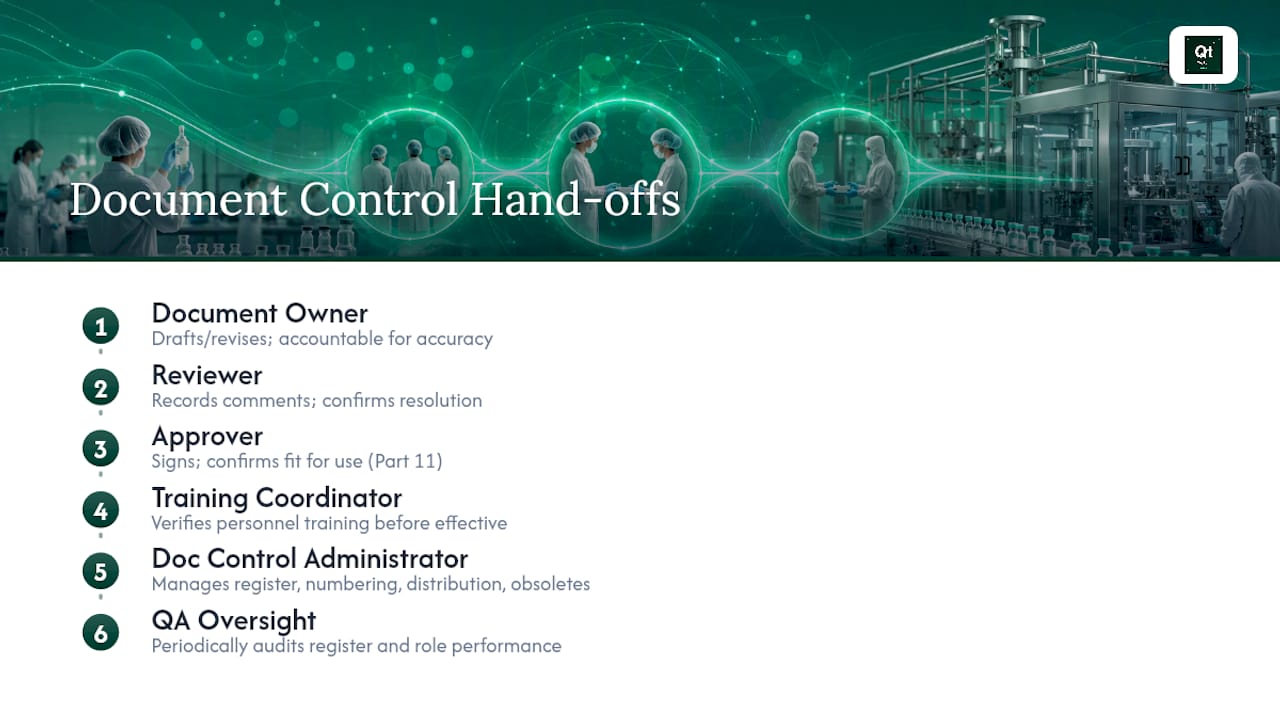
Reviewers carry a distinct duty: they must document their comments and confirm resolution before a document moves to approval, not simply initial a cover sheet. Approvers, often QA management or a department head, sign to confirm the document is fit for use, and that signature has to mean something specific and provable, per Part 11's requirements for identity and intent behind electronic signatures.
Training coordinators sit at a junction point that gets underweighted constantly: they confirm personnel have completed training before a revised document becomes effective, which is exactly the control that prevents the "outdated SOP still in use" finding. QA oversight, finally, audits the whole system periodically, checking that the register matches reality and that roles are functioning as designed rather than just documented as designed.
Smaller organizations often combine these roles across fewer people. That is fine, as long as segregation of duties is preserved where it matters most, specifically, the person approving a document should not be the sole person confirming it was reviewed. Blur that line and your approval record stops meaning anything to an inspector.
How Should Document Control Connect to Risk Management?
Treating every document with identical rigor wastes effort on low-risk records and, worse, under-controls high-risk ones. Risk management should determine review frequency, approval level, and validation depth for each document category, not a flat policy applied uniformly across your quality system.
A batch record governing a sterile fill-finish step carries different risk than an internal work instruction for labeling supply requisitions. The former warrants tighter revision control, more frequent periodic review, and a higher approval tier. Annex 11's risk-based validation principle already assumes this logic for computerized systems, and the same thinking should extend to the documents those systems manage.
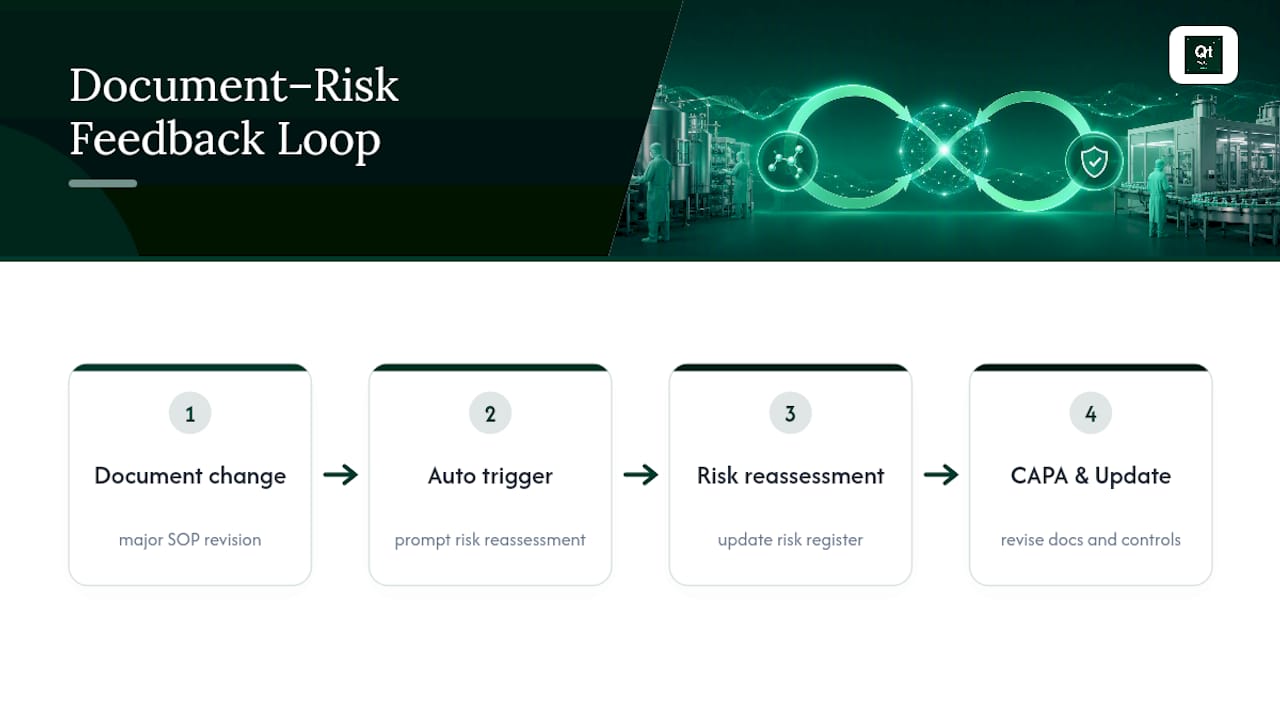
The connection runs both directions. Risk assessments themselves are controlled documents, subject to the same version control and approval workflow as any SOP. And document-control failures, an SOP followed in an outdated form, a missing training record, feed directly back into your risk register as new or elevated risks requiring reassessment. Organizations that treat these as separate systems end up with risk assessments that go stale the moment a related procedure changes, because nothing in the workflow forces reconciliation.
The practical fix is to build risk triggers into the document lifecycle itself: a major revision to a high-risk SOP should automatically prompt a review of the associated risk assessment, not wait for the next scheduled cycle. CAPA investigations should likewise flow into both document revision and risk reassessment simultaneously, closing the loop that inspectors are specifically trained to test.
Author perspective: practical priorities and pitfalls
The teams that pass inspections cleanly are not the ones with the prettiest SOP templates. They prioritize risk-based controls, real data governance, and validated automation over cosmetic version-naming conventions. Document control is not file storage with extra steps, and treating it that way is the single most common root cause behind repeat findings, because nothing connects the document to training, CAPA, or the validation lifecycle around it.
— Matt
Get Audit-Ready Document Control Without the Manual Burden
Everything covered here, immutable approval evidence, distribution tracking, ALCOA+ verification, revision trails that survive an inspector's trace, is exactly what Qualitum's platform builds into the authoring and review process itself rather than bolting on after the fact. Instead of your team manually reconciling registers, chasing signatures, and reconstructing revision history under audit pressure, Validate·AI and Operate·AI apply ALCOA+ checks at write-time and review-time, with every record traceable through a multi-agent system deployed inside your own infrastructure.

Such platforms often offer validated, private deployment with zero data egress and customer-managed encryption controls, helping clarify validation scope early in adoption. If your document-control gaps are costing you authoring time or keeping you up before inspections, book a working session to see how a pilot fits your existing QMS.
Sources
- EudraLex - Volume 4 - Good Manufacturing Practice (GMP) guidelines
- 21 CFR Part 11 - Electronic Records; Electronic Signatures
FAQ
What Is a GxP Document?
A GxP document is any record that governs or provides evidence of an activity subject to Good Practice regulations, including SOPs, batch records, validation protocols, and specifications. It must be uniquely identified, reviewed, approved, and protected against use of superseded versions under PIC/S and WHO guidance.
What Is Document Control in Pharma?
Document control in pharma is the regulated process of drafting, reviewing, approving, distributing, revising, and retiring controlled records with full traceability at each stage. It differs from general document management by adding approval workflows, distribution tracking, and audit-ready records that inspectors can trace end to end.
What Does GxP Stand For?
GxP is shorthand for "Good Practice," where the "x" is a variable representing the specific discipline, such as Good Manufacturing Practice, Good Clinical Practice, or Good Laboratory Practice. Each variant shares the same underlying principle: documented, controlled processes that protect product quality and patient safety.
What Are the Five P's of GxP Compliance?
Definitions of the "five P's" vary across organizations and are not a formal regulatory term found in EudraLex, Part 11, or PIC/S guidance. Treat any specific five-P framework you encounter as a mnemonic device from a particular training program rather than an official regulatory standard.
Does Qualitum Replace an Existing QMS?
No. Qualitum integrates with your existing quality management system rather than replacing it, applying automated validation and ALCOA+ checks on top of the workflows you already run. Pricing and deployment details are available through the platform page or by requesting a pilot.
Recommended
- Qualification vs Validation: A Practical Guide for Pharma QA
- Part 11 Compliance: Inspection-Ready Checklist for QA Teams
- Data Integrity by Design: A Pharma QA Playbook
- Audit Readiness Checklist for Validation and QA Leaders
FAQ
What Is a GxP Document?
A GxP document is any record that governs or provides evidence of an activity subject to Good Practice regulations, including SOPs, batch records, validation protocols, and specifications. It must be uniquely identified, reviewed, approved, and protected against use of superseded versions under PIC/S and WHO guidance.
What Is Document Control in Pharma?
Document control in pharma is the regulated process of drafting, reviewing, approving, distributing, revising, and retiring controlled records with full traceability at each stage. It differs from general document management by adding approval workflows, distribution tracking, and audit-ready records that inspectors can trace end to end.
What Does GxP Stand For?
GxP is shorthand for "Good Practice," where the "x" is a variable representing the specific discipline, such as Good Manufacturing Practice, Good Clinical Practice, or Good Laboratory Practice. Each variant shares the same underlying principle: documented, controlled processes that protect product quality and patient safety.
What Are the Five P's of GxP Compliance?
Definitions of the "five P's" vary across organizations and are not a formal regulatory term found in EudraLex, Part 11, or PIC/S guidance. Treat any specific five-P framework you encounter as a mnemonic device from a particular training program rather than an official regulatory standard.
Does Qualitum Replace an Existing QMS?
No. Qualitum integrates with your existing quality management system rather than replacing it, applying automated validation and ALCOA+ checks on top of the workflows you already run. Pricing and deployment details are available through the platform page or by requesting a pilot.