ALCOA+ is the data integrity standard that FDA, PIC/S, and WHO use to judge whether your GxP records are trustworthy: Attributable, Legible, Contemporaneous, Original, Accurate (the original ALCOA mnemonic) plus Complete, Consistent, Enduring, and Available (the CCEA additions that form ALCOA+). If an inspector cannot confirm all nine attributes in your records, those records are at risk of being deemed unreliable, regardless of the underlying science.
Three actions to start closing gaps today:
- Pick your highest-risk system (a standalone HPLC workstation, a paper batch record, or a clinical EDC) and pull a 30-day audit trail extract. Verify that every entry carries a unique user ID, a system-generated timestamp, and a reason for any change.
- Confirm timestamp synchronization. Compare your instrument clocks against a traceable time source. Unsynchronized clocks are one of the most cited ALCOA failures in FDA warning letters.
- Locate and secure original raw files. For chromatography, that means the native data file, not a printed PDF. For paper records, it means the original handwritten entry, not a photocopy.
When an inspector arrives, the first documents they typically request include:
- Audit trail extracts from computerized systems (at least 90 days)
- The SOP governing data review and audit trail review
- A backup and restore test record confirming data can be retrieved
- Training records showing staff understand data integrity expectations
- A list of shared or generic user accounts (they expect zero)
Key Takeaways
ALCOA+ compliance requires nine demonstrable attributes across every GxP record, and the highest-risk gaps are almost always in electronic systems where audit trail functionality has been disabled or bypassed.
| Point | Details |
|---|---|
| Nine attributes, not five | ALCOA+ adds Complete, Consistent, Enduring, and Available to the original five; all nine are inspection criteria. |
| Audit trail is the first request | Inspectors pull audit trail extracts within the first hour; confirm yours covers at least 90 days and shows unique user IDs. |
| Original raw files must be retained | PDFs and transcribed spreadsheets are not originals; native instrument files must be preserved and retrievable. |
| System controls beat procedural reminders | Required fields, unique logins, and non-editable timestamps enforced at the system level prevent the failures SOPs alone cannot stop. |
| Qualitum enforces ALCOA+ at write-time | Every record is checked against all nine attributes automatically, with significant authoring time savings and inspection-ready audit trail exports. |
Table of Contents
- What is ALCOA, where did it come from, and why do regulators cite it?
- How does each ALCOA principle apply in practice?
- What does ALCOA+ add, and how do you demonstrate it?
- ALCOA vs. ALCOA+ vs. ALCOA++: what actually changes in practice?
- What regulatory guidance should you cite, and what do inspectors actually check?
- Common ALCOA+ violations and how to remediate them
- How do you implement ALCOA+ across operations?
- ALCOA+ examples across functions: before and after
- How automated validation platforms enforce ALCOA+ at write-time
- What ALCOA+ adoption actually looks like in practice
- Qualitum makes ALCOA+ enforcement automatic, not aspirational
- Sources
- FAQ
What is ALCOA, where did it come from, and why do regulators cite it?
ALCOA began as an FDA acronym, attributed to Stan Woolen of the FDA's Office of Regulatory Affairs in the 1990s, and was designed to give inspectors a consistent vocabulary for evaluating the reliability of GxP records. The five original letters stand for Attributable, Legible, Contemporaneous, Original, and Accurate. Over time, as electronic systems replaced paper, regulators recognized that five attributes were not enough to address the full lifecycle of a digital record, and the CCEA additions (Complete, Consistent, Enduring, Available) were formalized into what is now universally called ALCOA+.
The FDA's guidance on electronic source data in clinical investigations explicitly references attributable, contemporaneous, original, and accurate as the baseline expectations for electronic records. The FDA's Data Integrity and Compliance With Drug CGMP Q&A guidance extends those expectations into manufacturing environments, addressing audit trails, metadata, and the handling of original records in CGMP contexts. PIC/S, WHO, and ISPE GAMP 5 all use ALCOA+ as the organizing framework for their own data integrity guidance, which means a US-based manufacturer exporting to the EU or supplying WHO-prequalified markets faces the same nine-attribute standard from every direction.
Why does ALCOA matter to inspectors beyond a checklist? Because each attribute maps to a specific failure mode. A record that cannot be attributed to a specific person cannot establish accountability. A record that was not made contemporaneously cannot be trusted to reflect what actually happened. Together, the nine attributes form a chain of custody for data, and a break anywhere in that chain is enough to call the entire dataset into question.
How does each ALCOA principle apply in practice?
Attributable
Every entry must identify who made it and when. On paper, that means a handwritten signature or initials with a date on each entry, not a single signature at the bottom of a multi-page batch record. Electronically, it means a unique user login, never a shared or generic account, with the system capturing the user ID automatically at the time of entry.
Paper failure: A lab analyst signs the bottom of a five-page in-process testing form, but individual data entries on pages 2 and 3 carry no initials. An inspector cannot attribute those specific values to that analyst.
Electronic failure: Two analysts share a single HPLC workstation login. The audit trail shows "admin" made every entry, making individual attribution impossible.
Controls: SOPs must prohibit shared accounts. System configurations must enforce unique user IDs. Audit trails must capture the user ID, not just the session.
Legible
Records must be readable for the entire retention period, whether on paper or screen. Pencil entries, correction fluid, and faded thermal paper are the classic paper failures. Electronic failures include proprietary file formats that become unreadable when the software is retired, or compressed archives that cannot be opened without a specific codec.
Paper failure: A technician uses pencil to record pH readings, then erases and overwrites a value without explanation.
Electronic failure: Raw spectroscopy data is stored in a vendor-specific binary format. When the instrument is decommissioned, the software license lapses and the files can no longer be opened.
Controls: SOPs must specify approved writing instruments and prohibit erasure. Electronic records must be stored in formats that remain readable across the system lifecycle, or accompanied by a validated viewer.
Contemporaneous
Entries must be made at the time the activity occurs, not reconstructed afterward. This is one of the most frequently cited violations in FDA warning letters, because backdated entries are often detectable through metadata even when the paper record looks clean.
Paper failure: A batch record shows pH measurements recorded at 9:00 AM, but the instrument printout timestamps show the measurements were taken at 2:00 PM. The analyst filled in the batch record hours later.
Electronic failure: A system allows users to enter data with a manually typed date rather than a system-generated timestamp. Entries appear to have been made before the instrument was even powered on.
Controls: Electronic systems must use system-generated, non-editable timestamps. Paper workflows must include a step requiring the supervisor to compare instrument printout times against batch record entry times during review.
Original
The first capture of data is the original record, and it must be preserved. A printout of a chromatogram is not the original if the native data file exists. A transcribed value in a spreadsheet is not the original if the instrument generated a raw file.
Paper failure: A QC analyst records HPLC results on a scratch pad, then transcribes them into the official batch record and discards the scratch pad. The scratch pad was the original.
Electronic failure: An analyst exports a chromatogram to PDF, deletes the native .raw file, and submits only the PDF. The PDF cannot be reprocessed or verified for integration accuracy.
Controls: SOPs must define what constitutes the original record for each system. Instrument configurations must prevent deletion of raw data files. Validated systems must capture raw data automatically and store it in a protected location.
Accurate
Records must reflect what actually happened, without error or embellishment. Accuracy failures range from transcription errors to deliberate falsification, but the most common inspection finding is a system that allows values to be overwritten without an audit trail entry.
Paper failure: A stability analyst records a weight as 1.023 g when the balance printout shows 1.032 g. The transposition goes undetected because the reviewer does not compare the printout to the record.
Electronic failure: A LIMS allows a result to be edited after approval without generating an audit trail entry. A corrected value appears in the final report with no record of what the original value was.
Controls: Electronic systems must generate an audit trail entry for every change, capturing the original value, the new value, the user, the timestamp, and the reason. Paper workflows must require a second-person verification of transcribed values.
Pro Tip: The single most effective attribution control is removing the ability to enter data without a unique credential. If your system allows a "guest" login or a shared department account, that one gap will surface in every audit trail review an inspector conducts. Fix it before anything else.
Paper vs. electronic failure modes at a glance
| ALCOA Attribute | Common Paper Failure | Common Electronic Failure |
|---|---|---|
| Attributable | Unsigned or group-signed entries | Shared or generic user accounts |
| Legible | Pencil, correction fluid, faded thermal paper | Proprietary formats, retired software |
| Contemporaneous | Backdated entries, reconstructed records | Manual date fields, no system timestamp |
| Original | Discarded scratch pads, transcribed-only records | Deleted raw files, PDF-only archives |
| Accurate | Transcription errors, unchecked overwriting | Editable results with no audit trail |
What does ALCOA+ add, and how do you demonstrate it?
The four CCEA additions address record completeness and long-term reliability, areas where the original five attributes were silent.
Complete means every required data point is present, including any that show an unexpected or out-of-specification result. A batch record with a blank field for an in-process check is not complete, even if the analyst intended to fill it in later. Electronically, required fields must be enforced at the system level so that a record cannot be saved or submitted with missing entries. A CRF that allows a visit to be marked "complete" with unanswered mandatory questions fails this attribute.
Consistent means records follow a standardized format and that dates, units, and identifiers are applied the same way across all entries. A stability study where some analysts record dates as MM/DD/YYYY and others use DD-MMM-YYYY creates inconsistency that complicates data review and raises questions about transcription accuracy. Electronic controls include date-format validation at the field level and unit-of-measure picklists that prevent free-text entry.
Enduring means records must survive for the entire required retention period in a readable, retrievable form. WHO TRS 996, Annex 5 and FDA regulations both specify retention periods that can extend to 15 years or longer for certain GxP records. Enduring is not just about physical survival; it also means the technology needed to read the record must remain available. A record stored on a DAT tape with no working DAT drive is not enduring in any practical sense.
Available means records must be retrievable on demand, including during an unannounced inspection. Controls include documented backup schedules, tested restore procedures, and a defined maximum retrieval time. PIC/S guidance on data integrity expects organizations to demonstrate that records can be produced promptly and in a readable format.
Practical controls for CCEA:
- Enforce required fields at the system level; do not rely on procedural reminders.
- Standardize date and unit formats in system configuration, not just in SOPs.
- Document and test backup and restore procedures at least annually, with a written test record.
- Maintain a media migration plan for long-term archives so that format obsolescence does not create an availability gap.
- Define retrieval time expectations in your records management SOP and verify them during internal audits.
ALCOA vs. ALCOA+ vs. ALCOA++: what actually changes in practice?
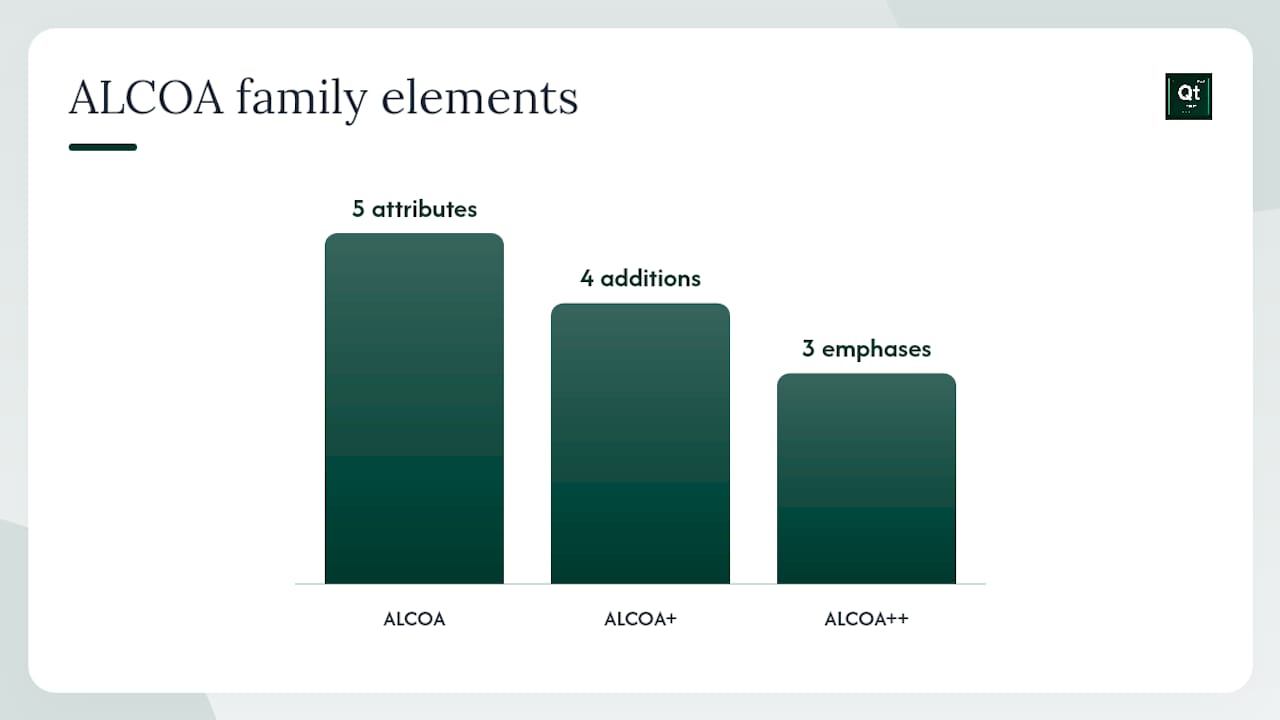
ALCOA is the five-attribute baseline: Attributable, Legible, Contemporaneous, Original, Accurate. It was designed primarily for paper records and early electronic systems and remains the minimum expectation in every GxP regulation.
ALCOA+ adds Complete, Consistent, Enduring, and Available. These four additions address the record lifecycle and format standardization that paper-era thinking did not fully anticipate. ALCOA+ is the current standard referenced in FDA, PIC/S, and WHO guidance and is the appropriate framework for any organization operating under GxP requirements today.
ALCOA++ is an informal extension used in some industry discussions to address the specific demands of modern, connected digital environments. It adds emphasis on metadata integrity, traceability across system integrations (LIMS to MES to EDC), and the security of audit trails in cloud-hosted or multi-tenant architectures. Practical industry guidance on ALCOA++ frames it as a response to the reality that a single record now often passes through multiple systems before it reaches a final report, and each handoff is a potential integrity gap.
When moving from ALCOA+ to ALCOA++ in written policy, the practical SOP changes include:
- Adding a metadata review step to audit trail review procedures, confirming that system-generated metadata (file creation date, modification history, user session data) is consistent with the record content.
- Requiring documented interface validation for any integration between a computerized system and an upstream or downstream system (e.g., an instrument server feeding a LIMS).
- Specifying security controls for audit trail data itself, including access restrictions that prevent even system administrators from modifying audit trail entries.
When to reference ALCOA++ explicitly in policy: if your organization operates digital-native systems with multiple integrated platforms, or if you are responding to an FDA observation that cited metadata or audit trail integrity specifically, ALCOA++ language in your data integrity policy signals that you understand the full scope of the problem. For most organizations, ALCOA+ remains the correct citation in SOPs, with ALCOA++ reserved for technical design specifications and CSV documentation.
What regulatory guidance should you cite, and what do inspectors actually check?
Primary guidance documents
- FDA Data Integrity and Compliance With Drug CGMP Q&A: the primary US reference for CGMP data integrity expectations, covering audit trails, original records, and metadata.
- FDA Electronic Source Data in Clinical Investigations: governs attributable, contemporaneous, original, and accurate expectations for clinical eSource.
- FDA 21 CFR Part 11: the regulatory foundation for electronic records and electronic signatures in FDA-regulated environments.
- PIC/S PI 041-1: Data Integrity and Record-Keeping: inspection-oriented guidance used by PIC/S member authorities, including the UK MHRA and many other regulators whose findings influence FDA thinking.
- ISPE GAMP 5, 2nd Edition: the industry standard for computerized system validation, covering metadata, audit trails, and lifecycle practices directly relevant to ALCOA+ implementation.
- WHO TRS 996, Annex 5: global expectations for records and data retention, particularly relevant for organizations supplying WHO-prequalified markets.
What inspectors check
During a data integrity-focused inspection, investigators typically request:
- Audit trail extracts from computerized systems, reviewed for completeness and for evidence of deletions or overwriting
- Timestamp synchronization records showing instruments are synchronized to a traceable time source
- Original raw data files for a sample of completed analyses, compared against the reported results
- SOPs for data review, audit trail review, and backup and restore
- Training records confirming staff have been trained on data integrity expectations
- A list of all user accounts, including any shared, generic, or administrator accounts
- System configuration records showing audit trail functionality is enabled and cannot be disabled by end users
- Backup and restore test records from the past 12 months
Common ALCOA+ violations and how to remediate them
Warning-letter-style failure examples
Illegible records: a paper batch record completed in pencil, with multiple erasures and no explanation. The final values cannot be verified against any original entry.
Backdated entries: an electronic system with a manual date field allows an analyst to enter a date of January 15 for a test performed on January 22. The instrument printout metadata contradicts the record.
Missing raw files: a QC laboratory retains only PDF printouts of HPLC chromatograms. The native data files were deleted after printing. Reprocessing to verify integration accuracy is impossible.
Altered chromatograms: audit trail review reveals that a chromatogram was reprocessed three times before the final result was reported, with each reprocessing attempt using different integration parameters. Only the final result appears in the batch record; the earlier attempts are not documented.
Four-step remediation checklist
- Contain. Quarantine the affected records and systems. Suspend further data entry in the affected system until the scope of the problem is understood. Document the containment action with a timestamp and the name of the person who initiated it.
- Investigate. Conduct a root cause analysis. Determine whether the failure was procedural (analyst did not follow the SOP), system-based (the system allowed an action the SOP prohibited), or deliberate. Use the data integrity testing guide to structure your investigation and document every finding.
- Remediate. Implement corrective actions. For system-based failures, update the system configuration and validate the change. For procedural failures, revise the SOP and retrain affected staff. For record-level failures, document the discrepancy and, where possible, reconstruct the record from original sources with a full explanation of the reconstruction process.
- Verify. Confirm that the corrective actions are effective. Re-audit the affected system or process after 30 and 90 days. Document the verification results and close the CAPA only after verification is complete.
Evidence to present to inspectors after remediation
- Written root cause analysis with supporting data
- CAPA record with specific corrective and preventive actions, owners, and due dates
- System change control records for any configuration changes
- Updated SOPs with revision history
- Training records showing all affected staff completed retraining
- A monitoring plan specifying how the corrected process will be audited going forward
How do you implement ALCOA+ across operations?
Phased implementation roadmap
Start with a gap assessment. Map every GxP system and record type against the nine ALCOA+ attributes. Prioritize systems by risk: a standalone HPLC workstation with no audit trail is higher risk than a validated LIMS with a functioning audit trail, even if the LIMS has minor procedural gaps. Embedding controls during system design is far less expensive than retrofitting them after an inspection finding.
Phase 1 (months 1–3): assess all GxP systems, document gaps, and rank by risk. Phase 2 (months 4–6): define controls for the highest-risk systems, update SOPs, and begin CSV remediation. Phase 3 (months 7–12): validate controls, train staff, and establish ongoing monitoring. After month 12, embed ALCOA+ checks into change control and deviation workflows so that any future system change triggers an automatic data integrity review.
CSV checklist items for data integrity
- Audit trail enabled and confirmed non-disableable by end users
- System clock synchronized to a traceable time source, with synchronization frequency documented
- Unique user accounts enforced; shared and generic accounts removed or disabled
- Raw data captured automatically and stored in a protected, non-editable location
- Backup schedule documented and tested; restore test records retained
- Required fields enforced at the system level for all critical data entries
- Date and unit formats standardized in system configuration
- User access roles defined and reviewed at least annually
ISPE GAMP 5 provides the lifecycle validation framework that ties these checklist items to formal validation deliverables (URS, FS, IQ, OQ, PQ), ensuring that each control is not just configured but tested and documented.
Sample SOP headings auditors expect
A data integrity SOP should include: Purpose, Scope, Responsibilities (who reviews audit trails, who approves exceptions), Definitions (what constitutes an original record for each system type), Procedure (step-by-step for data entry, review, and correction), Record Formats (approved forms and electronic templates), Retention Requirements (by record type and regulatory citation), and Referenced Systems (list of all GxP systems covered).
Pro Tip: Embed an ALCOA+ attribute check into your change control form. Add a mandatory field that asks: "Does this change affect any GxP system's audit trail, user access, timestamp configuration, or raw data storage?" A "yes" answer should automatically route the change to a data integrity review before approval. This catches gaps before they become inspection findings rather than after.
Red flags during implementation
- Shared or generic accounts that "everyone knows the password for"
- Audit trail functionality that can be disabled from the user interface
- Instrument clocks that drift more than a few minutes from the server time
- Paper records completed in pencil or with correction fluid
- Raw data files stored on local workstation drives with no backup
- Spreadsheets used as primary data capture tools without validation
ALCOA+ examples across functions: before and after
Manufacturing batch records
Before: A batch record for a tablet compression step contains a blank field for in-process tablet hardness at the 2-hour mark. The analyst noted verbally that the test was performed but did not record the result because it was within specification and had "nothing to report."
After: The SOP is revised to require all in-process results to be recorded, regardless of outcome. The batch record form is updated to make the hardness field mandatory. The analyst is retrained. Future records are reviewed by a second person specifically for completeness before batch disposition.
ALCOA+ gaps addressed: Complete, Accurate. Evidence: revised SOP, updated form, training record, completed batch records.
QC laboratory notebooks
Before: A QC analyst uses a spiral-bound notebook to record weighing data. Pages are not numbered sequentially, blank lines appear between entries, and corrections are made with correction fluid.
After: The laboratory switches to bound, pre-numbered notebooks. A SOP requires that blank lines be crossed out with a single line and initialed, corrections be made with a single strikethrough (original value still legible), and the reason for the correction noted. Notebooks are reviewed by a supervisor monthly.
ALCOA+ gaps addressed: Legible, Original, Attributable. Evidence: bound numbered notebooks, SOP, supervisor review records.
Chromatography raw data
Before: An HPLC system stores raw data files on a local workstation. The analyst exports results to a spreadsheet and deletes the raw files to free disk space. The spreadsheet is the only record of the analysis.
After: The HPLC system is reconfigured to store raw files on a validated network server with restricted access. Deletion of raw files requires a change control. The SOP specifies that the native data file is the original record and that the spreadsheet is a derived summary only.
ALCOA+ gaps addressed: Original, Enduring, Available. Evidence: server configuration record, change control, SOP, backup test record.
Stability studies
Before: Stability samples are pulled and tested over a weekend. The analyst records the pull date as Monday (the next business day) because "the system was down" on Saturday. The actual pull date and the recorded date differ by two days.
After: A procedure is established for weekend stability pulls, including a paper log that captures the actual pull date and time, signed by the analyst. The electronic system entry is made on Monday with a note referencing the paper log and the actual pull date. The paper log is retained as a supporting record.
ALCOA+ gaps addressed: Contemporaneous, Accurate. Evidence: paper pull log, electronic record with cross-reference note, SOP.
Clinical eSource and CRFs
Before: A site coordinator enters patient vital signs into an EDC system from handwritten notes taken during the visit. The handwritten notes are discarded after entry. The EDC entry is made two days after the visit.
After: The site implements a direct eSource workflow. Vital signs are entered into a tablet-based EDC at the point of care during the visit. The system generates a timestamp at entry. The FDA guidance on electronic source data explicitly supports this approach as the preferred method for attributable, contemporaneous electronic source data.
ALCOA+ gaps addressed: Contemporaneous, Original, Attributable. Evidence: EDC audit trail, system timestamp records, site training records.
Summary of vignettes, gaps, and inspector-ready evidence
| Function | Primary ALCOA+ Gaps | Remediation Action | Inspector-Ready Evidence |
|---|---|---|---|
| Manufacturing batch records | Complete, Accurate | Mandatory fields, second-person review | Revised SOP, updated form, training record |
| QC lab notebooks | Legible, Original, Attributable | Bound numbered notebooks, correction SOP | Notebooks, SOP, supervisor review log |
| Chromatography raw data | Original, Enduring, Available | Network server storage, deletion change control | Server config record, backup test, SOP |
| Stability studies | Contemporaneous, Accurate | Paper pull log with cross-reference | Pull log, EDC note, SOP |
| Clinical eSource/CRF | Contemporaneous, Original, Attributable | Direct eSource at point of care | EDC audit trail, timestamp records, training |
How automated validation platforms enforce ALCOA+ at write-time
Manual ALCOA+ compliance depends on people remembering to follow procedures under time pressure. That is a structural weakness, not a training problem. An automated validation platform addresses it differently: by making non-compliant entries technically impossible rather than procedurally discouraged.
Qualitum's platform enforces ALCOA+ at both write-time and review-time through a multi-agent architecture that checks each record against all nine attributes before it is saved. Specific enforcement mechanisms include:
- Automatic attribution: every record entry is tied to the authenticated user session; no entry can be made without a unique credential.
- Required fields: mandatory fields are enforced at the system level for all critical data points; a record cannot be submitted with blank required entries.
- System-generated timestamps: all entries carry a non-editable, system-generated timestamp; no manual date fields exist for GxP data.
- Raw-file capture: original data files are captured automatically and stored in a protected location; the system does not permit deletion without a documented change control.
- Immutable audit trail: every change generates an audit trail entry capturing the original value, the new value, the user, the timestamp, and the reason; audit trail data cannot be modified by any user, including administrators.
The Validate·AI module covers the full validation lifecycle, from URS through PQ, with each deliverable authored by the agentic system and checked against ALCOA+ at generation. The Investigate·AI module supports deviation and CAPA workflows with traceable evidence extraction, so that the root cause analysis and corrective action records are themselves ALCOA+-compliant.
For auditors, the platform produces a live traceability matrix that maps every requirement to its test evidence, and an audit trail export that is formatted for direct submission to inspectors. Integration with LIMS, MES, and EDC systems is documented through validated interface specifications, giving inspectors end-to-end traceability across the data flow.
When preparing for an inspection, teams using Qualitum can use the audit readiness checklist to confirm that all ALCOA+ evidence is in place and retrievable before the inspector arrives.
What ALCOA+ adoption actually looks like in practice
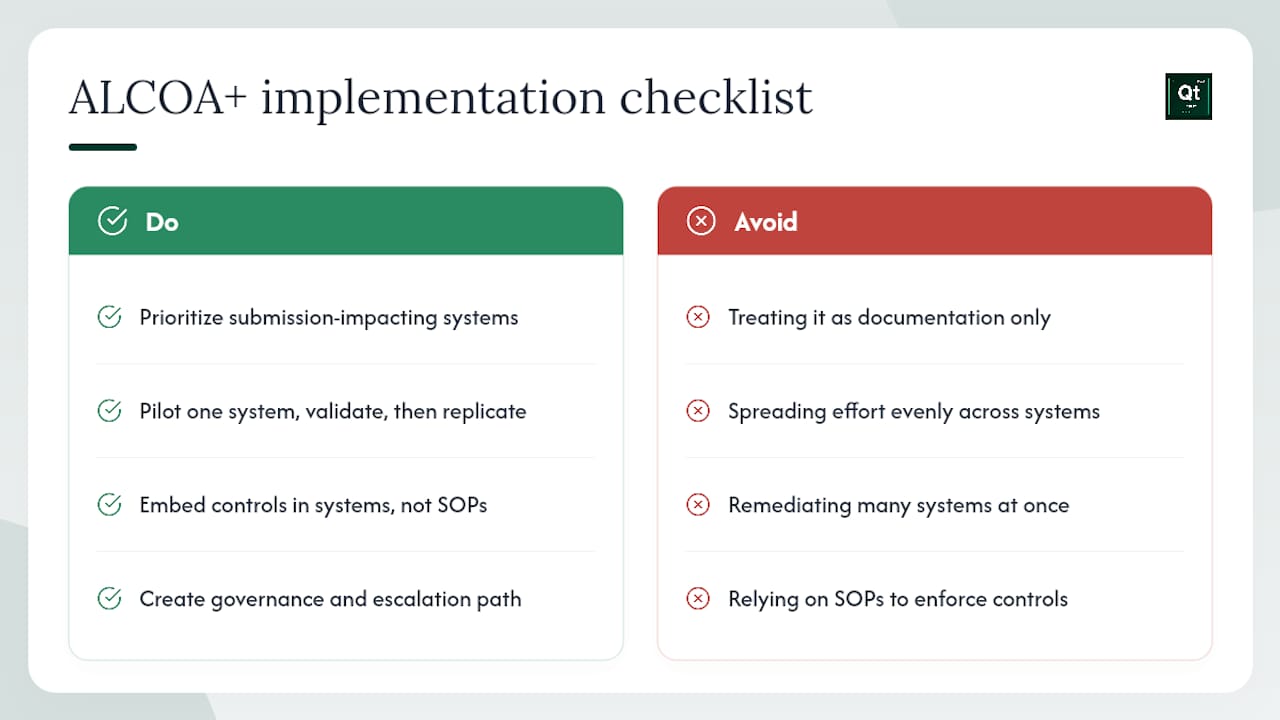
The most common mistake organizations make when implementing ALCOA+ is treating it as a documentation project rather than a systems and culture project. Teams produce a new data integrity policy, update a handful of SOPs, and consider the work done. Then an inspector pulls an audit trail and finds shared accounts that nobody thought to disable because they were "only used for instrument calibration."
Three lessons that consistently separate successful implementations from ones that generate repeat findings:
Prioritize critical systems, not all systems. A risk-based approach means starting with the systems that generate data used in regulatory submissions or batch disposition decisions. A validated LIMS feeding a product release decision is higher priority than a spreadsheet used to track office supply inventory. Spreading effort evenly across all systems is how organizations run out of resources before they fix the systems that actually matter.
Start small and prove the model. Pick one system, implement full ALCOA+ controls, validate them, and document the evidence. Then use that system as the template for the next one. Organizations that try to remediate 40 systems simultaneously rarely finish any of them before the next inspection.
Embed controls in workflows, not just in SOPs. A SOP that says "do not use shared accounts" does not prevent shared accounts. A system configuration that makes shared accounts technically impossible does. The same logic applies to every ALCOA+ attribute: the most durable control is one that the system enforces, not one that relies on an individual remembering to follow a procedure under pressure.
One pattern worth flagging: organizations that implement ALCOA+ controls successfully in their primary manufacturing site often discover, during a follow-up inspection, that their contract testing laboratory or CRO is operating under a completely different data integrity standard. Cross-functional alignment means extending ALCOA+ expectations to every organization that generates data used in your regulatory submissions, with supplier qualification audits and contractual data integrity requirements to back it up.
Governance matters as much as technical controls. Designate a named data integrity owner with the authority to escalate unresolved gaps to senior management. Establish a data integrity committee that reviews audit trail findings, deviation trends, and training completion quarterly. When a gap cannot be resolved at the operational level, the escalation path should be clear, documented, and actually used.
Qualitum makes ALCOA+ enforcement automatic, not aspirational
Closing ALCOA+ gaps manually is expensive and fragile. Every SOP revision, retraining cycle, and audit trail review conducted by hand is time your validation team is not spending on the work that moves products forward. Qualitum gives pharmaceutical, biotech, and medical device teams a faster path: every validation record is ALCOA+ checked at write-time and review-time by the platform itself, so compliance is built into the process rather than bolted on after the fact.

The Qualitum platform covers the full validation lifecycle, from URS through PQ and cleaning validation, with a live traceability matrix, immutable audit trail, and direct integration with your existing quality management systems. The Validate·AI module enforces required fields, system-generated timestamps, and raw-file capture automatically, removing the manual failure modes that generate warning letters.
To see how Qualitum maps to your highest-risk systems and what an ALCOA+-compliant audit trail export looks like in practice, book a working session with the team.
Sources
Start with the FDA Q&A, then move to ISPE GAMP 5 for system-level controls, then PIC/S for inspection-oriented examples. That sequence gives you the regulatory mandate, the technical implementation framework, and the inspector's perspective in the right order.
- FDA guidance: Electronic Source Data in Clinical Investigations
- FDA guidance: Data Integrity and Compliance With Drug CGMP — Questions and Answers
- PIC/S guidance: Data integrity and record-keeping
- ISPE GAMP 5 guide (2nd edition)
FAQ
What are the nine ALCOA+ principles?
ALCOA+ covers Attributable, Legible, Contemporaneous, Original, and Accurate (the original five) plus Complete, Consistent, Enduring, and Available. All nine apply to GxP records in pharmaceutical, biotech, and clinical research environments.
What are some concrete ALCOA+ examples in pharma?
Common examples include requiring unique user logins for HPLC systems (Attributable), retaining native chromatography raw files rather than PDF exports (Original), using system-generated timestamps instead of manual date fields (Contemporaneous), and enforcing mandatory fields in batch records so no in-process result can be left blank (Complete).
What is ALCOA++ and how does it differ from ALCOA+?
ALCOA++ is an informal industry extension that adds emphasis on metadata integrity, traceability across integrated systems (LIMS, MES, EDC), and audit trail security for digital-native environments. ALCOA+ remains the standard regulatory citation; ALCOA++ language is most useful in technical design specifications and CSV documentation for complex, multi-system architectures.
Is ALCOA a GLP requirement?
ALCOA principles apply across GxP environments, including GLP (Good Laboratory Practice), GMP (Good Manufacturing Practice), and GCP (Good Clinical Practice). The FDA, OECD GLP principles, and ICH guidelines all reference data integrity expectations consistent with ALCOA attributes, making them relevant to any regulated laboratory or clinical setting.
How does Qualitum support ALCOA+ compliance?
Qualitum enforces all nine ALCOA+ attributes at write-time and review-time through automatic attribution, required fields, system-generated timestamps, raw-file capture, and an immutable audit trail. The platform produces inspection-ready audit trail exports and a live traceability matrix, covering the full validation lifecycle from URS through PQ.
Recommended
- Audit Readiness Checklist for Validation and QA Leaders · Qualitum blog
- Cleanroom & utility qualification · Validate·AI · Qualitum
- Investigate·AI · Qualitum
- Operate·AI · Qualitum
FAQ
What are the nine ALCOA+ principles?
ALCOA+ covers Attributable, Legible, Contemporaneous, Original, and Accurate (the original five) plus Complete, Consistent, Enduring, and Available. All nine apply to GxP records in pharmaceutical, biotech, and clinical research environments.
What are some concrete ALCOA+ examples in pharma?
Common examples include requiring unique user logins for HPLC systems (Attributable), retaining native chromatography raw files rather than PDF exports (Original), using system-generated timestamps instead of manual date fields (Contemporaneous), and enforcing mandatory fields in batch records so no in-process result can be left blank (Complete).
What is ALCOA++ and how does it differ from ALCOA+?
ALCOA++ is an informal industry extension that adds emphasis on metadata integrity, traceability across integrated systems (LIMS, MES, EDC), and audit trail security for digital-native environments. ALCOA+ remains the standard regulatory citation; ALCOA++ language is most useful in technical design specifications and CSV documentation for complex, multi-system architectures.
Is ALCOA a GLP requirement?
ALCOA principles apply across GxP environments, including GLP (Good Laboratory Practice), GMP (Good Manufacturing Practice), and GCP (Good Clinical Practice). The FDA, OECD GLP principles, and ICH guidelines all reference data integrity expectations consistent with ALCOA attributes, making them relevant to any regulated laboratory or clinical setting.
How does Qualitum support ALCOA+ compliance?
Qualitum enforces all nine ALCOA+ attributes at write-time and review-time through automatic attribution, required fields, system-generated timestamps, raw-file capture, and an immutable audit trail. The platform produces inspection-ready audit trail exports and a live traceability matrix, covering the full validation lifecycle from URS through PQ.